Our storage solution uses snapshots to clone PeopleSoft environments running on Linux. Using our in-house cloning tool, Dolly, we first detach the data volumes from the target environment. We then create a clone of the required snapshot from the source environment and attach these volumes to the target environment.
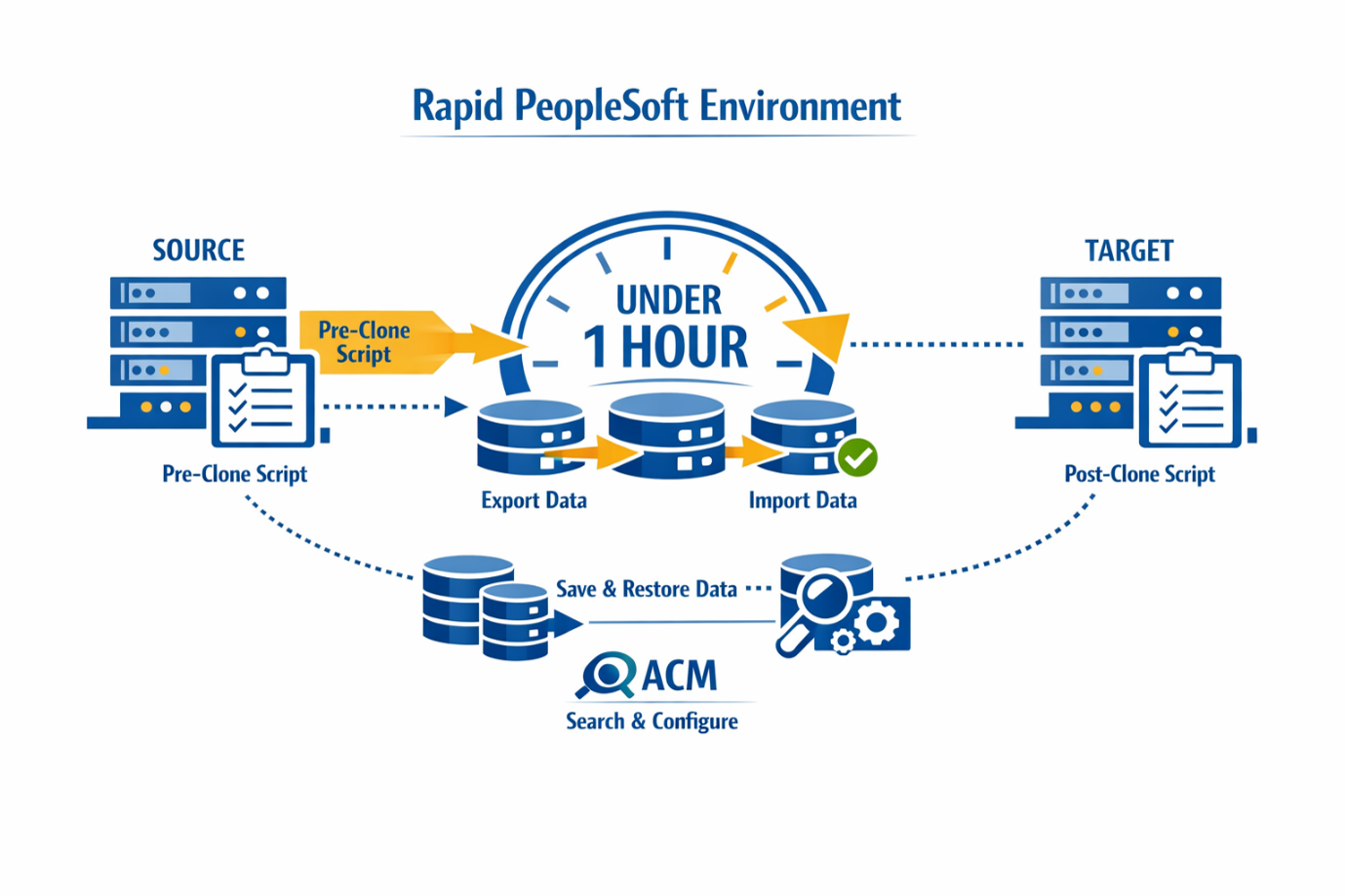
At a high level, the process is as follows. Preparatory scripts are executed on the target environment, after which the environment is stopped. The existing target volumes are detached and renamed. The source volumes are then cloned to the target environment and reattached. The database is restored and renamed, followed by the execution of post-clone scripts. Finally, the target environment is started and a notification is sent.
Custom shell scripts can be invoked at every stage of the cloning process. This is configured per environment through a configuration file containing variables such as CLONE_PRE_ROOT and CLONE_POST_DB. Each variable refers to a script that runs at a specific stage of the procedure.
This mechanism ensures that environment-specific components are handled correctly. For example, we secure files on the source system, export selected tables, databases or PeopleSoft user accounts, and restore them after cloning. Where necessary, we also adjust table contents to meet the requirements of the target environment. For loading environment-specific data, we use the PeopleTools ACM functionality.
The original data volumes of the target environment are retained for a limited period. This allows us to revert to a previous state or retrieve specific data if required.
Each clone always includes both the database and the PeopleTools home, preventing version inconsistencies. Environment-specific data, particularly domain-related data, is preserved, while SQL scripts executed after cloning ensure that all required database values are correctly updated.
This approach enables us to provide a fully functional cloned environment within approximately one hour, at any time. Customers can also initiate this process themselves via our self-service tool, Gisgo®.